
Continuing to use "Joey Ramone Test" client as example
How to submit individual request?
Each individual request (whether it is from Adult, Child, or Non_Client) must be associated with their Household Request record.
1. Go into the Household Request record page.
Note: On the right-hand side of the page is where you can submit Household Member Request. The Screen shown reacts to the "Record Type" of the Household Request you're currently in.
2. Household Member Request Screen.
- Check the "Yes" box
- Next

3. Choose a record type of Household member request, complete the form and then Save.
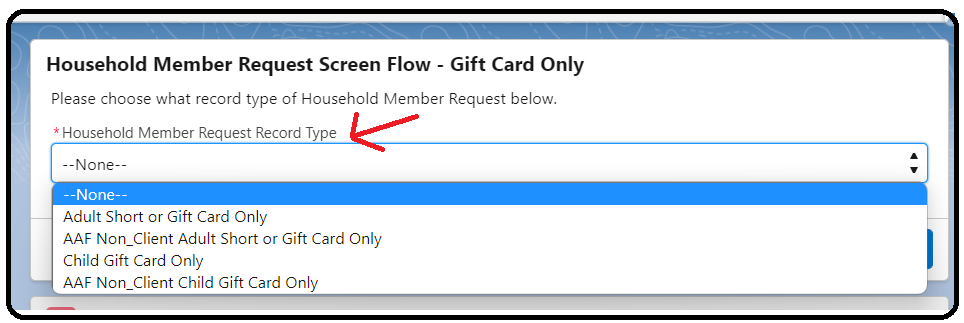
4. Web Link
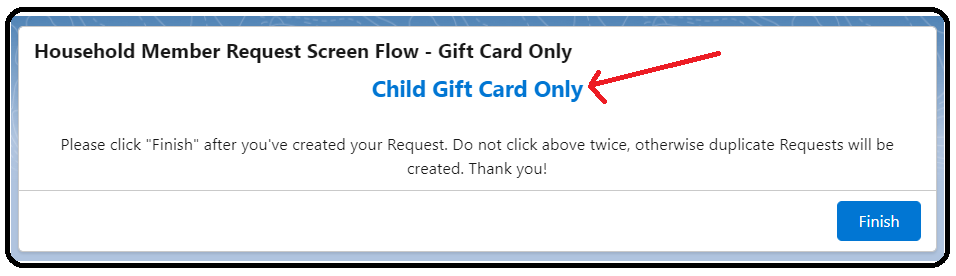
The web Link shown depends on what "Record Type" of Household Member Request selected in the previous step. In this case, the "Record Type" selected was "Child Gift Card Only". Click on the Web link to open the page to enter Member Request information.
5. Fill out the "Household Member Request" form
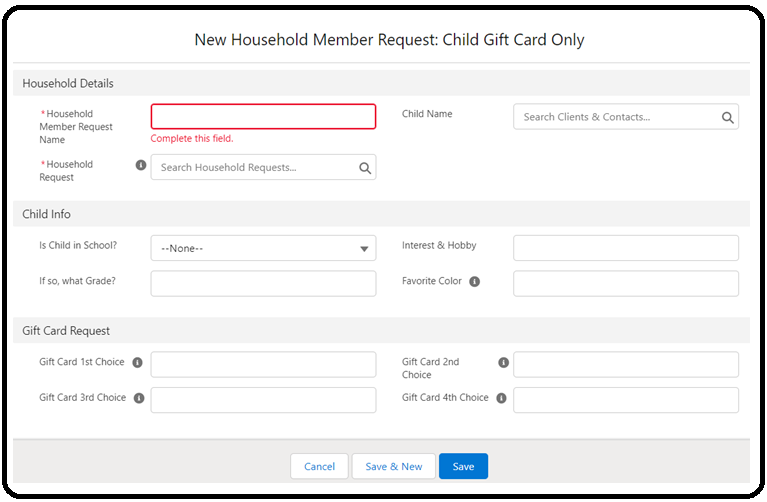
6. Important fields you should pay attention to
Household member Request Name: just type any random character here, upon Save of the page, our automation rule will create the Name for this request. (Note this system field cannot be left blank)
Household Request: Look up the Household Request record.
Client household: auto-populated by formula.
Adult Name: Look up the Name of the Adult client
Child Name: Look up the Name of the Child Client
Non_Client Name: Look up the Name of the Non_Client. If not existed, create new from this field.